Tuesday, April 12, 2011

番茄肉醬義大利麵


材料:
1. 豬絞肉 *200g
2. 牛番茄 *2顆
3. 紅蘿蔔 *1/3根
4. 洋蔥 *1/2個
5. 番茄糊
6. 義式香料粉
7. 鹽
8. 紅酒 (剛好有喝剩的)
9. 義大利麵條

步驟:
1. 紅蘿蔔, 洋蔥切細丁
2. 番茄屁股切十字燙一下, 稍微放涼後去皮切塊
3. 另起一鍋水煮滾放入義大利麵加點鹽
4. 炒豬絞肉, 加紅酒
5. 加入紅蘿蔔, 洋蔥丁繼續炒
6. 放入番茄塊, 番茄糊, 鹽, 義式香料粉及稍許水調味
7. 悶煮到入味
8. 義大利麵煮熟後撈起呈盤淋上番茄肉醬
9. 撒起司粉

其實吃起來蠻台味的XD
問題出在哪啊 囧

Monday, April 11, 2011

暖呼呼的羅宋湯


第一次喝到羅宋湯是小時候跟爸媽去西餐廳,
之後就迷上它啦!
酸中帶了點甜味又有很濃郁的牛肉香,
還有好多好多蔬菜在裡面.

相較於咖哩跟馬鈴薯燉肉,
同樣都有馬鈴薯紅蘿蔔跟洋蔥,
可是咖哩跟馬鈴薯燉肉就一定要淋在飯上吃(或是搭烏龍麵)才對味,
但是羅宋湯單喝完全沒問題準備起來就更方便啦!
怕餓到頂多再拿麵包沾著吃.

材料:
1. 牛肋條 *3條
2. 牛番茄 *2顆
3. 馬鈴薯 *2顆
4. 紅蘿蔔 *1/3根
5. 洋蔥 *1/4個
6. 高麗菜 *1/6個
7. 番茄糊
8. 義式香料粉
9. 鹽
(西洋芹我省略了)

步驟:
1. 牛肋條川燙去血水, 稍微放涼後切塊
2. 馬鈴薯, 紅蘿蔔切小塊
3. 洋蔥切片, 高麗菜切絲(不用太細)
4. 牛肉塊用平底鍋將表面煎熟後撈起
5. 用煎牛肉的稍微炒一下馬鈴薯跟紅蘿蔔
6. 另取一個鍋子將適量水煮沸後加入1-6項材料
7. 再度沸騰時以7-9調整至自己喜歡的味道
8. 持續燉煮或將鍋子放入電鍋蒸
9. 完成

Monday, March 14, 2011

How to create user account for In App Purchase testing?

Apple provides a sandbox environment for developers to test app without creating real financial transactions. The sandbox environment returns transactions as if payments were processed successfully.

The sandbox environment uses special iTunes Connect accounts that are limited to In App Purchase testing. You cannot use your normal iTunes Connect account to test your store in the sandbox.

1. Log into iTunes Connect and go to page "Manage Users"

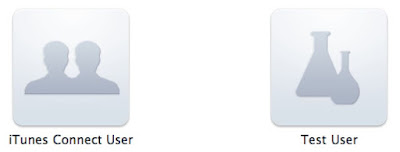
2. Select "Test User", then click "Add new user" on next page

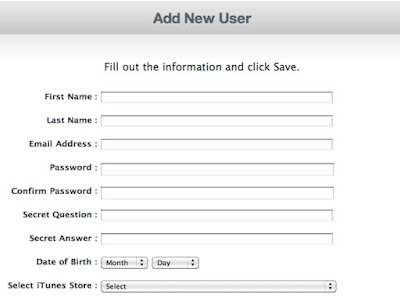
3. Fill in all information, then click "Save"
- email address of the test account can't be associated with any other Apple account
- don't log into a production environment with test account, otherwise the account credentials will become invalid and cannot be used as a test account again
- email address doesn't need be valid
- password should contain at least one number and capital character

4. All test accounts will be listed here


ref: iTunes Connect Developer Guide

Thursday, March 10, 2011

麻婆豆腐


材料:
1. 中華有機豆腐 *2盒
2. 豬絞肉 *250g
3. 青蔥 *1支
4. 蒜頭 *3顆
5. 花椒 *1小茶匙
6. 辣椒 *1支
7. 豆瓣醬
8. 辣油
9. 醬油

中華有機豆腐是裝在正方形的盒子裡面,
會買它不是因為有機,
而是發現他比一般的中華豆腐(用長方形盒子裝)還容易拿出來XD
不只是膜很好撕開,
豆腐也一倒就出來了不需要用刀子劃四邊搞半天.
大概貴個兩三塊我覺得還可以接受.

步驟:
1. 豆腐取出切塊後丟入沸水中泡著 (據說燙過之後豆腐比較容易入味也比較不容易破掉)
2. 青蔥切小段, 蒜頭切末
3. 起油鍋爆香花椒後把花椒撈起來 (花椒炒太久會苦)
4. 丟入蒜末辣椒炒香
5. 加入豬絞肉炒散及用辣油, 豆瓣醬, 醬油調味
6. 豆腐放至鍋中加適量水燉煮, 小心翻拌讓豆腐均勻入味
7. 完成

參考: 紐西蘭美女, 果味山小湯匙

Tuesday, March 08, 2011

How to upload binary to iTunes Connect?

1. Login to iTunes Connect and go to page "Manage Your Applications"
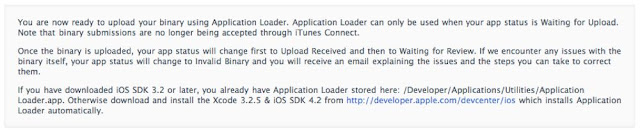
2. Click button "Ready to Upload Binary" if the status of your app is "Prepare for Upload"
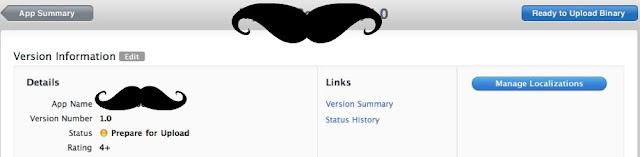
3. iTunes Connect guide you to upload binary with "Application Loader"
- if you have iOS SDK 3.2 or later, you can locate "Application Loader" in folder /Developer/Applications/Utilities
- otherwise, you can download it through link provided on this page
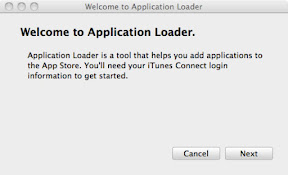
4. Launch "Application Loader", click "Next"
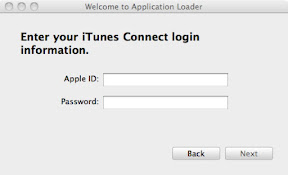
5. Enter iTunes Connect id/password, click "Next"
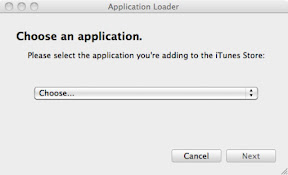
6. Select the application you are adding binary for, click "Next"
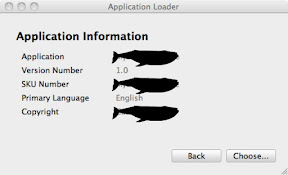
7. Information of application you selected will be displayed on the dialog, click "Choose"
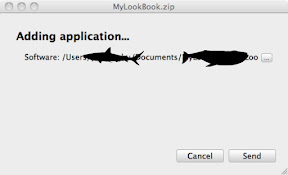
8. Select binary file, click "Send"
- the file need to be build for distribution and are compressed in zip format
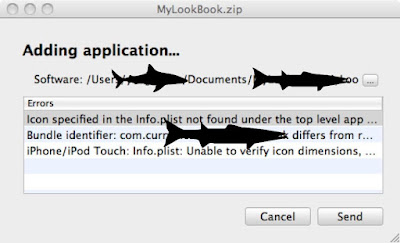
* If there's something wrong with the binary file, error messages will be listed below.
Here are some common errors:
- binary file is not signed correctly
- application icon is missing or the format is incorrect (Guide for setting application icon)

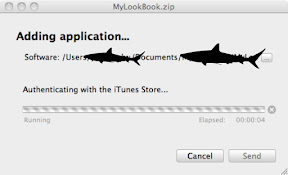
9. Authenticating with iTunes Store
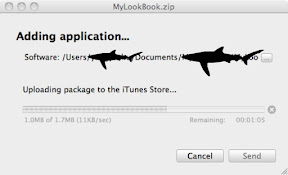
10. Uploading binary file
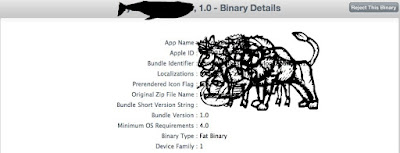
10. Upload complete, back to the Manage your Applications page in iTunes Connect to view the status of your app
- if the binary is not final version and you don't want it to be put in review queue, you can click "Reject This Binary"
- you can resubmit the binary anytime
Wednesday, January 19, 2011

玉米濃湯, 不是康寶的哦!

之前在ptt罐頭版看到玉米罐頭的討論,
原來有人會一邊看電視一邊用湯匙直接挖玉米吃耶!
另外還看到玉米濃湯的食譜決定來做做看囉.

材料:
1. 玉米醬 *1罐 (400g)
2. 玉米粒 *半罐 (100g)
3. 火腿 *1/6條
4. 紅蘿蔔 *1/6條
5. 洋蔥 *1/4個
6. 牛奶 *100g
7. 水 *100g
8. 雞粉

步驟:
1. 洋蔥, 紅蘿蔔, 火腿切丁
2. 湯鍋倒入油先炒洋蔥到透明再加入紅蘿蔔跟火腿
3. 倒入水, 玉米醬, 玉米粒煮到滾
4. 加入牛奶繼續煮以及用些許雞粉調味
5. 完成


喝起來超甜的咧!

後來看到其他部落格,
有的食譜會加把馬鈴薯煮熟之後跟玉米混在一起打成泥,
這樣喝起來質地就很細緻.
不過我是沒果汁機可以打啦=.=

看費神跟西萌的比賽已經寫了三篇blog囉XD
萌萌加油!

冬瓜蛤蠣湯


材料:
1. 冬瓜 *1片
2. 蛤蠣 *忘記多少(全聯買的一小盒)
3. 嫩薑 *1小塊
4. 青蔥 *1支

步驟:
1. 蛤蠣泡鹽水吐沙後撈出來
2. 冬瓜切塊, 薑切絲, 蔥切小段
3. 湯鍋放入冬瓜加水煮到滾(我喜歡吃煮的很爛的冬瓜)
4. 冬瓜煮的差不多就放入蛤蠣, 薑跟蔥
5. 加入鹽調味
6. 完成

這次因為太餓了冬瓜還沒爛就想吃啊XD
以後還是都切小塊一點好了.

誰是肉羹和魷魚羹的好朋友!!?? 麵條? 米粉? 冬粉? 粄條? 兜雞!!??

我是一個不管吃什麼羹都配米粉的人溜,
不過像黑先生就只愛麵條.
最近又發現好像很多人都點羹粄條.

讓我對於誰是羹的好朋友感到太好奇了.
就在噗浪上來了個調查. (票數應該沒算錯吧 囧)

麵條: 4
米粉: 10
冬粉: 2
粄條: 3
意麵: 2
飯: 1
不加: 2

米粉獲得壓倒性的勝利耶 (歡呼撒花)
不知道是不是參加調查的人裡面高雄人居多的關係.
不過就我所知很多人是不管怎樣都不吃米粉的.
另外還發現粄條的死忠粉絲很多.

最後再補一下我喜歡的吃法
麵條: 乾麵/炒麵/餛飩麵
米粉: 炒米粉/羹米粉
冬粉: 牛肉冬粉
粄條: 乾粄條
意麵: 乾意麵
飯: 燴飯(有湯汁的就算)

報告完畢 (揮手)

Tuesday, January 04, 2011

家庭必備良菜: 馬鈴薯燉肉

幾乎每個料理初學者都有做過馬鈴薯燉肉啊!
就跟每個人心中都有一座斷背山一樣(痾真的一樣嗎XD)

材料:
1. 馬鈴薯 *2個
2. 紅蘿蔔 *1條
3. 洋蔥 *0.5個
4. 蒜頭 *4個
4. 梅花豬肉片 *200克
5. 日式鰹魚醬油
6. 烹大師
7. 味淋

步驟:
1. 馬鈴薯,紅蘿蔔切丁丟入內鍋, 加水至食材高度, 放兩杯水開始蒸
2. 洋蔥切絲, 蒜頭切丁
3. 蒜頭爆香炒洋蔥
4. 加入肉片用些許醬油調味
5. 電鍋跳起來後把肉片跟洋蔥放入內鍋, 加入味淋, 醬油及烹大師, 放一杯水開始蒸
6. 完成

超下飯的香菇瓜仔肉

絞肉算是處理起來蠻方便的東西,
之前做過玉米絞肉(便當相當常見的東西)還有漢堡排,
這次就來試試香菇瓜仔肉囉!

材料:
小香菇 *10朵
脆瓜 *12片
青蔥 *1支
蒜頭 *4顆
絞肉 *250克
脆瓜湯汁
香菇水


步驟:
1. 香菇泡軟切丁(香菇水要留著) 脆瓜,蒜頭切丁 青蔥切小段
2. 蒜頭爆香加入香菇丁炒香
3. 加入絞肉脆瓜丁還有脆瓜湯支跟香菇水煮至入味
4. 起鍋前加入蔥小段
5. 完成

真是相當簡單.
配白飯又超好吃的啊!

Monday, December 27, 2010

聖誕夜吃不飽的白酒海鮮義大利麵

看了神之雫還有侍酒師就一直對酒很有興趣.
尤其是料理跟酒的結婚真是很有意思啊!
也想要自己試試弄些配酒的菜.

之前已經煎過牛排搭紅酒.
這次就煮白酒海鮮義大利麵啦!

材料:
1. 淡菜 *約300g
2. 花枝 *忘記多少
3. 洋蔥 *1/3個
4. 蒜頭 *4瓣
5. 辣椒 *2支
6. 白酒 *250ml
7. 義大利麵 *用的是圓條形的

白酒用的是澳洲Preece酒莊Sauvignon Blanc(白蘇維翁),
酒標很漂亮*O*

其實入菜應該要買更便宜的,
但是有很怕直接喝會不好喝那就很殘念XD

步驟:
1. 洋蔥切丁, 蒜頭切塊, 辣椒切絲
2. 淡菜隔水解凍, 花枝切條
3. 水煮滾把義大利麵丟進去再加點鹽巴, 麵熟後撈起
4. 熱鍋加橄欖油, 蒜頭稍微爆香後把洋蔥丁放進去炒到透明
5. 把花枝跟淡菜丟入鍋中加白酒悶炒
6. 花枝淡菜(好像XD)熟了就先撈起來, 湯汁留著把麵加進去炒到稍微收乾

完成,
味道挺不錯的但是花枝煮太老=.=


飯後甜點:草莓


光吃這些果然不會飽啊XD
後來又去買了炸雞還有煮湯圓 囧

Wednesday, December 22, 2010

How to integrate iAd into your iPhone app

STEPS

1. add iAd framework to your project

(1) Right click Frameworks: Add\Existing Frameworks…
(2) Select "iAd.framework"

(3) "iAd.framework" has been added to your project


2. add ADBannerView to your view
ADBannerView *iAd = [[ADBannerView alloc] initWithFrame:CGRectMake(x, y, w, h)];
iAd.delegate = self;
[self.view addSubview:iAd];
iAd.hidden = YES;
3. implement ADBannerViewDelegate
- (void)bannerViewDidLoadAd:(ADBannerView *)banner {
banner.hidden = FALSE;
NSLog(@"bannerViewDidLoadAd");
}

- (BOOL)bannerViewActionShouldBegin:(ADBannerView *)banner willLeaveApplication:(BOOL)willLeave {
NSLog(@"bannerViewActionShouldBegin");
return YES;
}

- (void)bannerViewActionDidFinish:(ADBannerView *)banner {
NSLog(@"bannerViewActionDidFinish");
}

- (void)bannerView:(ADBannerView *)banner didFailToReceiveAdWithError:(NSError *)error {
banner.hidden = TRUE;
NSLog(@"didFailToReceiveAdWithError, error:%d ", [error code]);
}

Why it's important to implement ADBannerViewDelegate?

To detect the status of loading advertisement.
In some situation, ads might not be available.
That's why view controller hide ADBannerView after iAd been created in step 2.
When the advertisement has been successfully loaded (- (void)bannerViewDidLoadAd:(ADBannerView *)banner is called),
the view controller then make ADBannerView visible.
If advertisement is not available, ADBannerView will never show up.
Therefore, user will not see a blank area on ADBannerView.

Here's the image that illustrates ADBannerView is added to a view and advertisement is successfully loaded.


If user touch ADBannerView, a popup view will show up and details of the advertisement will be displayed.
After user close the popup view by touching (X), he will go back to the app directly.


reference:
1. Technical Q&A: Hiding iAd banners when ads are not available
2. iAd programming guide
3. How to integrate iAd into your iPhone app include details about:
- solution for setting target sdk < 4.0
- display iAd according to current orientation
- put iAd in table view

青花菜炒香菇... 還有紅蘿蔔

其實這沒甚麼好寫的,
但是因為這是我第一次煮生香菇(之前都是弄乾香菇)覺得應該要記錄一下XD

生香菇切起來好有彈性哦!
觸感好好(飄)
生香菇我以後也要跟你當好朋友(抱)


材料:
1. 青花菜 *1大顆
2. 紅蘿蔔 *半條
3. 香菇 *4大朵
4. 蒜頭 *3顆
5. 辣椒 *1條
6. 雞粉
7. 橄欖油

步驟:
1. 切碎各種材料們 (紅蘿蔔我都會切的很細這樣吃起來紅蘿蔔味才不會太重)
2. 水煮滾, 青花菜燙到大概九分熟撈起來
3. 熱油炒蒜頭
4. 把紅蘿蔔跟香菇丟進去炒用雞粉調味
5. 把青花菜丟到平底鍋炒到熟


香菇本來長這麼大結果炒完變好小*O*

Sunday, December 19, 2010

這位太太 - 有時候


詞/曲: 阿牧

只想瞧你一眼
我只是想和你說再見
別問我為何如此決定
別問我

有時候人不知自己到底在做什麼
有時候人不知自己到底在想什麼
有時候人只是呆呆地往前走
往前走

Monday, December 06, 2010

上海市區趴趴走: 孫中山紀念館, 周恩來故居, 田子坊, 丹咖啡

離開人民公園之後來到思南路,
忘記是從地鐵哪一站冒出來開始走XD
雖然說思南路兩旁種滿了梧桐挺美的是條適合散步的路,
但是我們走了超級久都沒看到什麼餐廳.
餓到快升天了=.=

[孫中山紀念館] 香山路7號

好不容易走到孫中山紀念館,
孫中山先生翹腳坐在椅子上還挺帥氣低.
不過因為門票要錢而且急著想吃飯就沒進去參觀囉!


[周公館] 思南路73號

沿著思南路繼續走沒多久來到周恩來故居又稱為周公館.
門票不用錢所以所以我們跑進去晃了一圈,
周公館是棟三層樓的洋房,
一進門就可以看到藤蔓攀爬在花架上,
後院有個綠油油的草坪還挺幽靜的.


[田子坊]

接著又繼續努力的走終於到了田子坊.
這裡有許多創意小店.


在覓食的途中看到幾個老井,

雖然今天一直下著綿綿細雨但是田子坊的人潮還是很多啊!
好不容易找到一間還有位子的餐廳.

[丹咖啡]

丹咖啡的老闆是日本人,
ㄧ樓的狹小的空間是老闆烘培咖啡豆的地方,
筷子套的前面折成鶴的樣子.
而且他是丹頂鶴優.

這是二三樓.

我們各自點了關東煮和漢堡排.
關東煮的沾醬是黃芥末挺特別低.

漢堡排超級好吃低.
可是某位先生只願意分我一口Q.Q
沙拉淋上的是胡麻醬!

吃飽之後樓下門口也都坐滿人啦!

吃飽之後就開始逛街 (飛舞)
在這家買了熊貓小龍/熊貓解放軍的便條紙還有個上海灘名片夾.
可是找不到拍的照片東西又都已經送出去惹=.=
就只能沒圖沒真相了.

在田子坊狹窄的巷弄穿梭,
樓舍間的上方有電線雜亂交錯著,
幾個鳥籠就這樣掛著.
其實還挺有生活的氣息.


因為雨還是持續的下,
我們就提早回到徐家匯啦!

Thursday, December 02, 2010

How to support facebook single sign-on in your iphone app

PREPARATION
1. download latest facebook sdk for iOS
2. register your application with facebook: http://www.facebook.com/developers/createapp.php
3. set name and picture for your application (for user to have an idea about the application they are going to authenticate)

HOW TO INTEGRATE FACEBOOK SDK WITH YOUR PROJECT

1. add source code under folder FBConnect to your project
2. include the FBConnect headers in your code
#import "[RELATIVE_PATH]/FBConnect.h"
3. init Facebook object
Facebook* facebook = [[Facebook alloc] init];

WHAT IS SINGLE SIGN-ON?
The new authentication mechanism that users no longer have to re-enter their credentials to authenticate each app if valid session already exists Facebook official app or Safari.

HOW SINGLE SIGN-ON WORKS?
It relies on iOS's fast app switching. Your app trigger FBApp/Safari for authentication. After the user grants or declines the authorization, the FBApp/Safari redirects back to your app, passing the authorization token, expiration, and any other parameters the Facebook OAuth server may return.

SINGLE SIGN-ON FLOW


SUPPORT SINGLE SIGN-ON
1. bind your app to a URL scheme corresponding to your Facebook application ID by modifying .plist file of your app

2. catch FBApp/Safari redirection by implementing this in your app's main AppDelegate
- (BOOL)application:(UIApplication *)application handleOpenURL:(NSURL *)url{
[facebook handleOpenURL:url];
}


START AUTHENTICATION
1. call authorize method
[facebook authorize:{YOUR_APP_ID} permissions:{PERMISSIONS} delegate:self];


HOW TO DISABLE SINGLE SIGN-ON?
1. in Facebook.m authorize method
[self authorizeWithFBAppAuth:NO safariAuth:NO];


ref: https://github.com/facebook/facebook-ios-sdk/